Standard Operating Procedures for Small Business Made Easy
If routine tasks keep coming back to you, your team may be missing clear instructions. Standard operating procedures for small business help turn the work you explain repeatedly into steps someone else can follow.
You do not need to document your whole company at once. This guide shows you what to write first, how to test each procedure and how to keep it useful as your business grows.
Quick answer
A standard operating procedure, or SOP, explains how to complete a recurring task to an agreed standard. Start with one important process, define who handles it, write the steps and test them with a trained colleague. Keep an approved version where your team does the work.
What makes an SOP useful
An SOP gives a person enough detail to act without guessing. It explains when to start, what tools to use, which decisions need approval and what a correct result looks like.
The Institute of Management Accountants identifies consistent work, employee training and clear accountability as benefits of documented procedures. Those benefits depend on people using instructions that match the actual job.
For example, “handle new leads” leaves several questions unanswered. A useful procedure explains where inquiries arrive, who checks them, what details to record and when to assign the next action.
SOPs, policies and checklists serve different purposes
A policy sets a rule, such as who may approve a refund. An SOP explains how to review a refund request and carry out the approved decision. A checklist helps a trained person confirm that the required actions are complete.
Use these together when needed. A short checklist can support an SOP, but it should not leave a new team member guessing how to complete an unfamiliar task.
Which processes should you document first
Start where unclear instructions create the most trouble. Look for repeated questions, missed handoffs, costly errors or work that stops when one person is away. Include important tasks that happen rarely if a mistake would have serious consequences.
For a newly formed business, begin with the path from inquiry to delivery. An established business should also review tasks that cause rework or complaints. If you still have an idea, test how the service will work before treating your draft instructions as final.
The examples below show practical starting points. Choose the one closest to your current problem.
Process | What the SOP should clarify | Evidence of completion |
New lead response | Who replies and assigns the next action | Contact record with an owner and due date |
Client onboarding | What must be ready before work begins | Completed intake and accepted handoff |
Invoice preparation | Which approved details to check | Invoice checked and sent through the agreed system |
Service delivery | Which checks happen before release | Completed quality review |
Customer complaint | Who can resolve it and when to escalate | Recorded outcome and customer update |
How to create standard operating procedures for small business
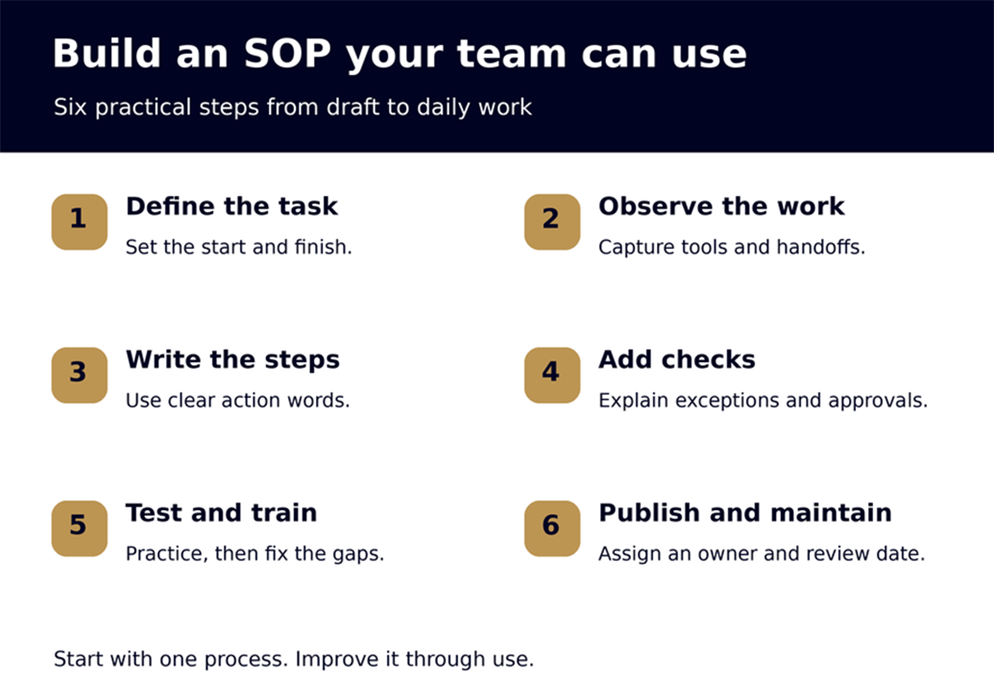
1. Set a clear start and finish
Choose one task with a clear boundary. “Set up a new client project” is easier to document than “manage operations.” Define the event that starts the task and the result that ends it.
For client setup, the trigger might be an approved handoff from sales. The finish might be a complete project record that the delivery lead has checked and accepted. Include any conditions that must be met before starting.
This keeps your instructions focused. Avoid combining sales, billing and delivery into one long procedure. Link separate SOPs at the points where one role passes work to another.
2. Walk through the work with the person who does it
Watch a normal run of the task. Ask the person to explain what they check, which information they need and what makes them pause. Capture decisions as well as clicks.
Write down the tools, templates and permissions involved. A CRM, or customer relationship management system, stores customer details and interactions. If your process uses one, name the relevant record and fields so the reader knows where to work.
Check each handoff with the receiving person. What do they need before they can begin? Avoid writing an ideal process from memory while leaving out the workarounds your team uses. Resolve weak points before making them standard practice.
3. Write instructions someone can follow
Use a descriptive title and short numbered steps. Start each instruction with an action, such as open, check, record or send. Include the location of the approved template and explain any unfamiliar term.
Replace “update the client file” with a clear action: “Open the client record and enter the service, project owner and agreed start date.” Add a screenshot only when it helps someone find a screen or field. Remove private information from any example.
The US Environmental Protection Agency explains that SOPs have no single correct format. Although its guidance serves a formal quality program, the useful principle is simple: provide enough detail for a person with basic knowledge of the task to repeat it.
Avoid adding background that does not help the reader act. If several paths need different instructions, split them into short subsections with clear conditions.
4. Add checks and exception handling
Explain how the person will know the work is correct. An invoice check might compare the customer name, agreed service and amount with the approved order. A delivery check might confirm that all agreed files are present.
Then cover likely exceptions. If information is missing, say who requests it and where to record the delay. If the system fails, explain who receives the issue and which actions must wait.
Set approval limits before publishing the SOP. “Ask a manager if needed” leaves too much open. Name the role that decides, the information they need and what the worker can do while waiting. Avoid letting an exception quietly become an unauthorized change to the customer's agreement.
5. Test the procedure and train the team
Ask a colleague with the required skills and access to follow the draft. Use a practice record when a live mistake could affect a customer. Let them work through it while you note unclear steps.
Check the result, not just whether they reached the end. Did they choose the right template? Can the next person find the information? Does the exception path work when a required field is missing?
Revise the draft and repeat the affected steps. Then show the team how to use the approved version. Avoid treating a document link as complete training. Give people a chance to practice and explain when they should stop for help.
6. Publish one version and assign an owner
Store the approved SOP in a shared location and link it from the relevant task or project template. Give each procedure an owner who checks its accuracy and an approver who accepts major changes. In a small team, one person may hold both roles.
Record the version, approval date and next review date. Choose a review schedule based on how often the work changes and the impact of an error. Review sooner when software, roles or service terms change or when an incident exposes a gap.
Archive old versions and remove outdated links from active tasks. Tell affected staff what changed and whether they need more training. Avoid sending separate copies around by email, which makes it harder to know which instructions are current.
A simple SOP example you can adapt
This is an illustrative example for a small consulting business, not a real client case study. The roles and process are examples, not requirements for every company. Adapt them to your tools and agreements.
Example procedure for setting up a new client project
Purpose: Give the delivery team the information needed to begin the agreed work.
Start: Sales submits an approved client handoff after the business has met its agreed conditions for starting work.
Owner and backup: The operations coordinator maintains the procedure. The owner of the business handles the task when the coordinator is away and approves process changes.
Required access: The client record, approved scope of work, intake form and project template. The scope of work describes what the business has agreed to deliver.
1. Open the sales handoff and check the client name, contact details, service and agreed start date against the approved scope.
2. Check the intake form for the information the delivery team requires. If anything is missing, record the gap and request it before marking intake complete.
3. Search for an existing client record. Update the correct record or create one if none exists.
4. Create the project from the approved template. Link the scope and intake record, then assign the delivery lead and task dates.
5. Ask the delivery lead to confirm that the project details are complete and the schedule is workable. Record any unresolved issue for the business owner to decide.
6. After acceptance, send the approved welcome message with the confirmed next step. Record the handoff and message in the client record.
Exception: If the requested service differs from the approved scope, pause project setup and ask the business owner to resolve the difference. Do not promise extra work or a new date without approval.
Completion check: The delivery lead has accepted the project, required records are linked and the welcome message reflects the agreed plan.
Document control: Add the actual version, approval date and review date before your team uses the procedure.
Keep the system simple and secure
You can start with documents and task tools your team already uses, provided they offer suitable access controls and version history. Create an index with each SOP's title, owner, current link and review date.
The cost of creating SOPs depends on process complexity, staff time, testing and any specialist review. Plan for maintenance as well as drafting. Consider dedicated software when search, approvals or tracking become difficult to manage in your existing setup. Check current pricing before buying.
Keep passwords and private customer details out of shared procedure documents. The Federal Trade Commission advises businesses to limit access to personal information based on job needs. Give staff the instructions and permissions needed for their role without exposing unrelated records.
Connect procedures to the rest of your business
Your business strategy sets the service promise. Infrastructure provides the tools and records. Marketing and sales establish expectations, while delivery procedures help your team carry out the agreement. During launch, test these connections together.
For example, changing a service package may affect the proposal, intake form, project template and delivery SOP. Updating only one can leave your team working from conflicting instructions.
The Otto Firm's operations and SOP services cover core service procedures, client workflows, internal checklists and training processes. That work fits into a wider business build when the documents connect to the systems people use each day.
Once a process works, consider automating routine actions such as creating tasks or sending reminders. Keep a person responsible for exceptions and explain how to spot a failed or duplicate action. Automating an unclear process can repeat its mistakes.
Choose your next operational priority
If several parts of your business still depend on memory, take the free Business Readiness Assessment. Use it to consider which systems need attention, then choose one process to document and test.
Frequently asked questions
What should a small business SOP include?
Include the task's purpose, starting conditions, responsible roles, required tools, numbered steps, quality checks and exception instructions. Add a version, approval date and review date so people can identify the current procedure.
How long should an SOP be?
Make it long enough for a trained person to complete the task correctly. A simple task may fit on one page. Split complex branches into linked procedures instead of forcing everything into a page limit.
Who should write SOPs in a small business?
The person who performs the task should supply the working details. A manager or editor can organize the draft. Have the process owner approve it and another suitably trained person test it.
How often should SOPs be updated?
Update them when the process changes or a problem reveals missing instructions. Also set a review date based on the task's risk and rate of change. Record reviews even when no edits are needed.
Do you need SOPs if you work alone?
Yes, they can help you repeat complex tasks and prepare to delegate. Start with work that is easy to forget or costly to get wrong. Keep the instructions proportionate to the task.
Put one procedure to work
Choose a recurring task that caused a question or mistake recently. Define its finish, write the steps and test the result. Build your next SOP from what you learn, then judge progress by fewer missing details and smoother handoffs.
About the AuthorAldian Otto is the founder of The Otto Firm, a business consulting firm in Miami, Florida. He helps entrepreneurs build, fund and launch businesses through strategy, systems, operations, training and coaching. |